Visual edit
Click a field in the rendered preview, edit it inline, and watch the structured field in the Studio update. The overlay works with any framework that can render a server-side preview against the Estokad API; the first-class adapter is @estokad/next.
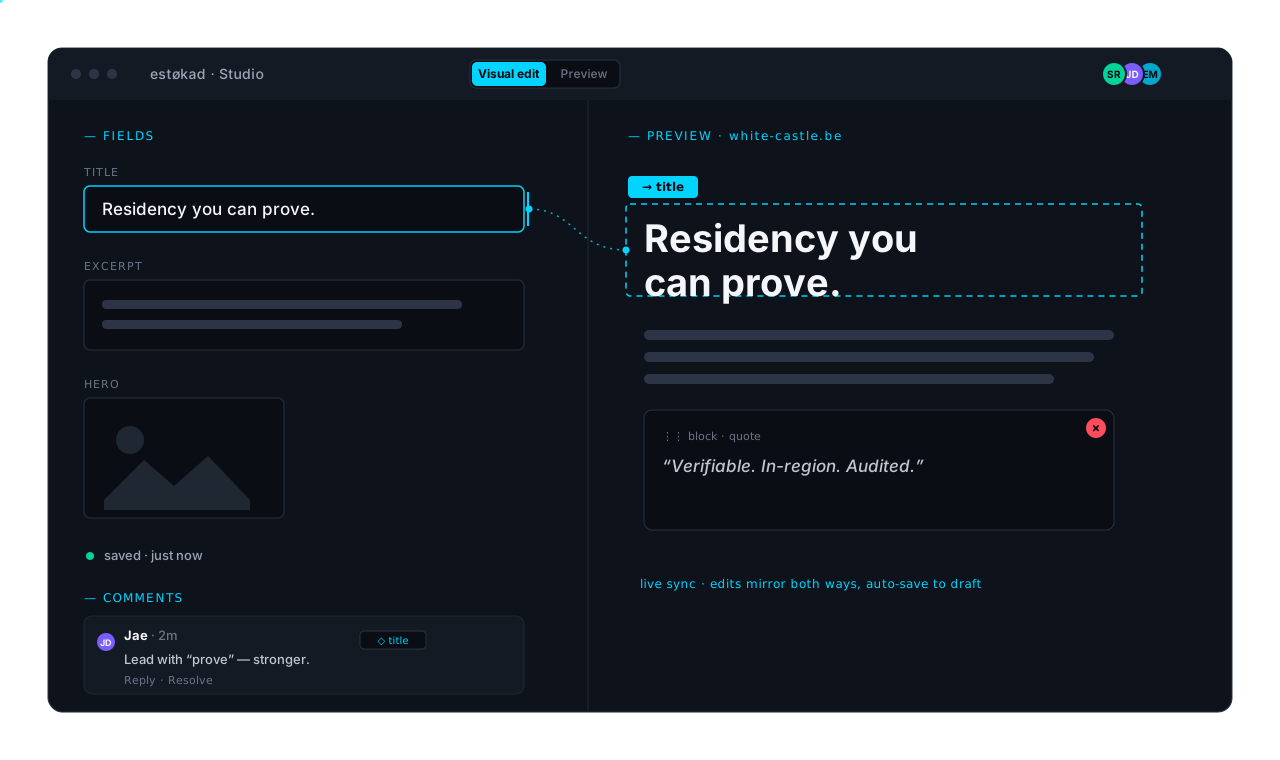
Illustration of the Studio's visual-edit view. It shows inline editing, live two-way sync, auto-save, presence, block composition, and comments — the features documented below.
How it works
Three actors coordinate:
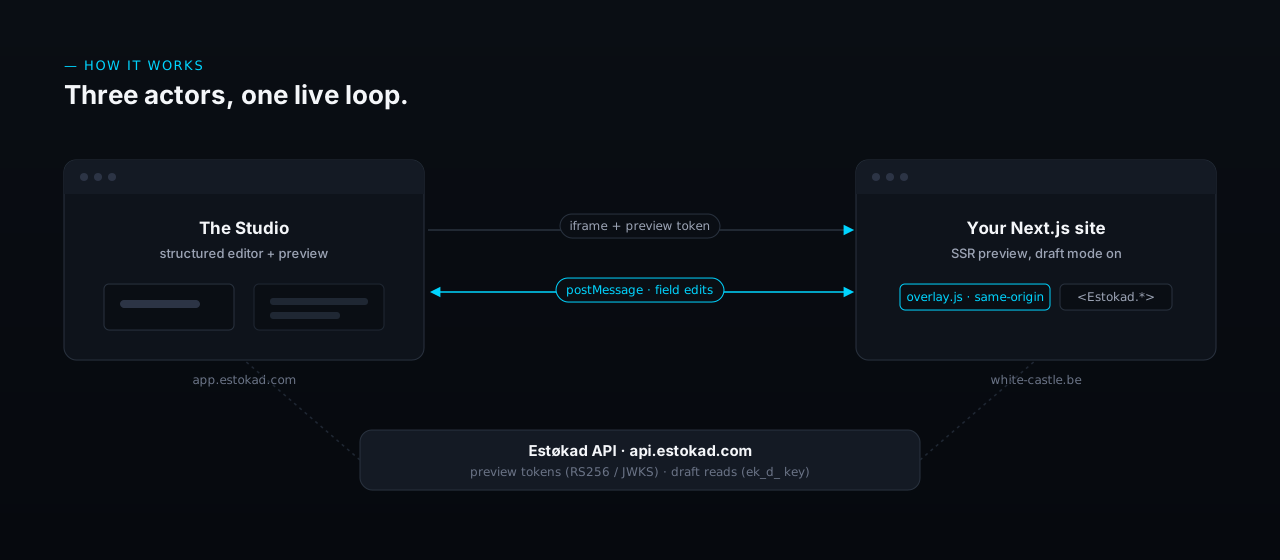
- The Studio opens an iframe to your preview URL with a short-lived preview token, and hosts the structured editor beside it.
- The overlay script injects into your preview in draft mode, listens for interactions on
data-estokad-*-tagged elements, and exchanges edit events with the Studio overpostMessage(strict origin checks both ways). It is served same-origin from your own site — see the overlay route below — not from a third-party CDN, which keeps it clear ofscript-srcCSP restrictions. - The adapter (
@estokad/next) gives you auto-tagging components. In production they render as plain HTML with zero overhead; in draft mode they emit thedata-estokad-*attributes the overlay reads.
Setup (Next.js App Router)
pnpm add @estokad/next
Environment
Your site needs three values (a fourth if you use the HMAC fallback):
| Variable | What it is |
|---|---|
| ESTOKAD_WORKSPACE | your workspace slug (e.g. default) — also fills the JWKS URL |
| ESTOKAD_API_URL | https://api.estokad.com |
| ESTOKAD_READ_DRAFT_KEY | a read_draft-scope API key (Studio → Settings → API keys), for fetching draft content |
| ESTOKAD_PREVIEW_SECRET | only if your region has no JWKS key and you verify with previewSecret |
No preview signing key lives on your site — verification is via the workspace's public JWKS.
First, wrap your app so the overlay loads in draft mode:
// app/layout.tsx
import { EstokadProvider } from '@estokad/next'

export default function RootLayout({ children }: { children: React.ReactNode }) {
  return (
    <html>
      <body>
        <EstokadProvider>{children}</EstokadProvider>
      </body>
    </html>
  )
}
In draft mode EstokadProvider renders a first-party <meta name="estokad-studio-origin" content="https://app.estokad.com"> (the origin verified from the signed token) and injects the overlay script; the overlay reads that meta tag to know which origin to talk to. In production it renders nothing.
Second, serve the overlay bundle same-origin:
// app/api/estokad/overlay/route.ts
import { estokadOverlayRoute } from '@estokad/next/overlay-route'
export const GET = estokadOverlayRoute
Third, wire the draft-mode handshake the Studio's preview button calls:
// app/api/draft/route.ts
import { estokadDraftMode } from '@estokad/next/draft'

export const GET = estokadDraftMode.enable({
  workspace: process.env.ESTOKAD_WORKSPACE!,
  // Production: verify with the workspace's published key (no shared secret).
  jwksUrl: `https://api.estokad.com/v1/${process.env.ESTOKAD_WORKSPACE}/.well-known/jwks.json`,
  // Or, for HMAC: previewSecret: process.env.ESTOKAD_PREVIEW_SECRET,
  // Optional defence-in-depth: only accept these Studio origins.
  allowedStudioOrigins: ['https://app.estokad.com'],
})
export const POST = estokadDraftMode.disable
Which verifier? A region that has asymmetric signing enabled publishes keys at /.well-known/jwks.json; verify with jwksUrl and there is no shared secret to store. A region that hasn't been provisioned with a signing key answers that endpoint 503 { keys: [] } — use previewSecret (the workspace's HMAC secret, shown in Studio → Settings once enabled) until it has one. Set exactly one; jwksUrl wins when both are present.
The route is hardened against a leaked preview link: it accepts only a token whose signed path is present and resolves to your own origin (never an open redirect), and it takes the Studio origin from the signed token payload — not a query parameter — so the overlay only ever talks to the origin the Studio actually minted the token for.
Fourth, if your site sets framing headers (most hardened sites do), relax them for draft-mode responses only. The Studio frames your site from https://app.estokad.com; a response carrying Content-Security-Policy: frame-ancestors 'none' or X-Frame-Options: DENY refuses that frame and the preview shows nothing.
// middleware.ts
import { NextResponse } from 'next/server'
import { estokadDraftFraming } from '@estokad/next/frame'

export function middleware(request: Request) {
  const res = NextResponse.next()
  // No-op outside draft mode — public responses keep frame-ancestors 'none'.
  return estokadDraftFraming(request, res, { studioOrigins: ['https://app.estokad.com'] })
}
On a draft response this sets frame-ancestors https://app.estokad.com (merged into any CSP you already send) and drops X-Frame-Options — which can't name an allowed origin, so it has to be absent on framed responses. Every public response keeps your deny posture untouched.
If your headers live in next.config (via headers()), the middleware helper can't help — those headers aren't on the response middleware sees, so there's nothing for it to merge into or delete. Key two header rules on the draft cookie instead, no middleware:
// next.config.ts
const DRAFT = { type: 'cookie', key: '__prerender_bypass' } as const
const CSP_PUBLIC = "default-src 'self'; frame-ancestors 'none'" // your real policy
const CSP_DRAFT = "default-src 'self'; frame-ancestors https://app.estokad.com"

export default {
  async headers() {
    return [
      {
        source: '/:path*',
        missing: [DRAFT], // public: full lockdown
        headers: [
          { key: 'Content-Security-Policy', value: CSP_PUBLIC },
          { key: 'X-Frame-Options', value: 'DENY' },
        ],
      },
      {
        source: '/:path*',
        has: [DRAFT], // draft: same policy, only frame-ancestors relaxed, no X-Frame-Options
        headers: [{ key: 'Content-Security-Policy', value: CSP_DRAFT }],
      },
    ]
  },
}
Write out both full policies yourself — this keeps your complete CSP intact and only changes frame-ancestors in draft, rather than handing framing to a helper that can't see the rest of your policy.
Tagging fields
Render your preview with the Estokad.* components. Each takes the entry id, content-type name, and field name so the overlay can bind the edit back to the right field.
import { Estokad } from '@estokad/next'

export default function Article({ post }) {
  const meta = { entryId: post.id, contentType: 'article' }
  return (
    <article>
      <Estokad.Text value={post.title} fieldName="title" as="h1" {...meta} />
      <Estokad.RichText value={post.body} fieldName="body" {...meta} />
      <Estokad.Markdown fieldName="body" {...meta}>{renderMarkdown(post.body)}</Estokad.Markdown>
      <Estokad.Number value={post.readingMinutes} fieldName="readingMinutes" {...meta} />
      <Estokad.Date value={post.publishedAt} fieldName="publishedAt" {...meta} />
      <Estokad.Boolean value={post.featured} fieldName="featured" trueLabel="Featured" falseLabel="—" {...meta} />
      <Estokad.Enum value={post.tier} options={['free', 'member', 'pro']} fieldName="tier" {...meta} />
      <Estokad.Image src={post.hero} fieldName="hero" alt={post.title} {...meta} />
      <Estokad.ImageUrl src={post.heroUrl} fieldName="heroUrl" alt={post.title} {...meta} />
    </article>
  )
}
Inline editing per type:
- Text / RichText — click to edit inline; RichText supports bold / italic / underline / strike / code / link via
⌘B/⌘I/⌘U/⌘K. - Markdown — bodies render through your own MDX pipeline, so they aren't edited in place. Clicking one focuses the field in the Studio's structured editor; save there and the preview refreshes. Wrap your rendered markdown in
Estokad.Markdown. Outside draft mode it renders its children unwrapped — no extra element on the reader's page. - Number — edits inline and validates on commit; a non-numeric value is rejected rather than saved.
- Date — click opens a native date picker.
- Boolean — click toggles the value in place.
- Enum — click opens a menu of the
optionsyou pass. - Image (asset) —
Estokad.Imageopens the Studio's asset picker. - Image (URL) —
Estokad.ImageUrlis for images stored as a plain URL in a text field (an external CDN, not a Studio asset); clicking lets the editor paste a new address, swapped in place.
Using next/image? Estokad.Image / Estokad.ImageUrl render a plain <img>, which drops next/image's srcset/sizes/priority handling. Keep your next/image and just spread estokadAttrs onto it instead:
<Image
  src={article.hero}
  alt={article.title}
  width={1200} height={630}
  {...(await estokadAttrs({ ...meta, fieldName: 'hero' }, 'image'))}
/>
When an editor swaps that image in preview, the overlay clears the element's srcset/sizes so the new URL shows immediately; the real responsive set returns on the next refresh.
Tagging your own markup
If your site maps content into its own components — an adapter layer, an MDX renderer, a design-system component — rather than the Estokad.* wrappers, spread the attribute contract directly with estokadAttrs. It returns the data-estokad-* attributes in draft mode and {} in production:
import { estokadAttrs } from '@estokad/next'

const meta = { entryId: article.id, contentType: 'article', fieldName: 'title' }

<h1 {...(await estokadAttrs(meta, 'text'))}>{article.title}</h1>
// enum/boolean current value + enum choices go in the third arg:
<span {...(await estokadAttrs(meta, 'enum', { 'data-estokad-value': article.tier, 'data-estokad-options': JSON.stringify(['free','member','pro']) }))}>
  {article.tier}
</span>
The attributes the overlay reads: data-estokad-entry (entry id), data-estokad-type (content type), data-estokad-field (field name), data-estokad-fieldtype (one of text, richText, markdown, number, date, boolean, enum, asset, image, referenceList), plus data-estokad-value (boolean/enum/image current value) and data-estokad-options (enum choices, JSON).
Block composition
Polymorphic referenceList fields render as reorderable blocks. Wrap the list in Estokad.Blocks and each item in Estokad.Block keyed by the referenced entry's id:
import { Estokad } from '@estokad/next'

<Estokad.Blocks entryId={page.id} contentType="page" fieldName="sections">
  {page.sections.map((block) => (
    <Estokad.Block key={block.id} id={block.id}>
      {/* render the block however you like; its inner fields can be
          Estokad.* components too */}
      <SectionRenderer block={block} />
    </Estokad.Block>
  ))}
</Estokad.Blocks>
In the preview, editors drag blocks to reorder them and remove a block with the × that appears on hover. The new order syncs to the Studio and saves. Adding a block is done in the Studio's structured picker for now.
This is composition over references, not free-form layout — Estokad is headless. Editors arrange the blocks you defined in the schema; they don't invent widgets or drag arbitrary boxes. If a customer wants a freeform page builder, they want Storyblok, not Estokad.
Refreshing after a save
When an editor publishes, the Studio tells the overlay to refresh. By default that's a full page reload — which loses scroll position and replays entrance animations. Register a soft handler so the preview re-renders in place instead. In Next.js, router.refresh():
'use client'
import { useEffect } from 'react'
import { useRouter } from 'next/navigation'

export function EstokadRefresh() {
  const router = useRouter()
  useEffect(() => {
    const onRefresh = (e: Event) => {
      e.preventDefault() // REQUIRED — without it the overlay still hard-reloads after
      router.refresh()
    }
    window.addEventListener('estokad:refresh', onRefresh)
    return () => window.removeEventListener('estokad:refresh', onRefresh)
  }, [router])
  return null
}
estokad:refresh is a cancelable event: the overlay falls back to a full window.location.reload() unless you call event.preventDefault() (or set a window.__estokadOnRefresh function, which short-circuits the reload on its own). Calling router.refresh() without preventDefault() gives you the soft refresh and then the hard reload — so always prevent the default. The one-liner alternative:
window.__estokadOnRefresh = () => router.refresh()
The same soft path is used when the Studio mirrors a formatted field (rich text, markdown, a reordered block list) that can't be patched into the DOM as plain text without losing its markup.
Browser support
Preview rides on Next.js's draft-mode cookie, which is a third-party cookie inside the Studio's iframe. The adapter re-issues it Partitioned (CHIPS) so Chrome and Firefox keep it with third-party cookies off, and the Studio origin the overlay needs is delivered in a first-party <meta> tag rather than a cookie. Safari's stricter partitioning can still drop the draft cookie in some configurations; if an editor on Safari sees the published page instead of their draft, allow cross-site tracking for app.estokad.com, or use a browser that supports partitioned cookies. This is the one part of the flow a browser can veto.
Preview tokens
Each iframe embed carries a short-lived token (default five minutes) scoped to one entry or preview path, signed by the region key (RS256, verifiable via the workspace's published JWKS) or an HMAC secret. Mint tokens via /v1/<workspace>/management/preview-tokens if you embed previews in your own tooling. For a link a stakeholder can open without a Studio login, the Studio's Share button issues a longer-lived, revocable link.
Configuring preview URLs
Two pieces combine into the URL the Studio opens.
Per space — the base. The Studio asks each space for its preview URL once, in Settings → Spaces, with template tokens the Studio fills before opening the iframe:
https://staging.your-site.com/api/draft?token={token}&path={path}
Per type — the path. {path} is derived from the content type's previewUrl template, declared in schema-as-code and reviewed in the same pull request as the type. Use {slug} and {id} tokens:
export const article = defineType({
  name: 'article',
  previewUrl: '/{slug}', // → /one-million-is-the-ceiling
  fields: { /* … */ },
})

export const author = defineType({
  name: 'author',
  previewUrl: '/authors/{slug}',
  fields: { /* … */ },
})
When a type has no previewUrl, the Studio falls back to /{typeName}/{slug}.
previewUrl needs @estokad/cli and @estokad/schema ≥ 0.3.1 — earlier versions don't compile the field, so estokad push never sends it and estokad diff reports "in sync" even after you add it (0.3.1 also teaches diff to show previewUrl changes). The Studio fills {path} from a type's previewUrl only once that schema has been pushed to the workspace; until then it uses the /{typeName}/{slug} fallback.